


Simple Radio: Live AM FM Radio
4.735.02K Reviews
App Specs
- Version
- 6.1.9
- Updated On
- License
- Free
- Downloads
- 50,000,000+
- Developer
- Streema, Inc.
- Categories
- Music & Audio
- Platform
- Android, iOS
Screenshots
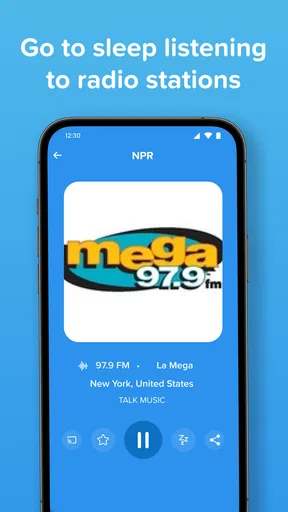
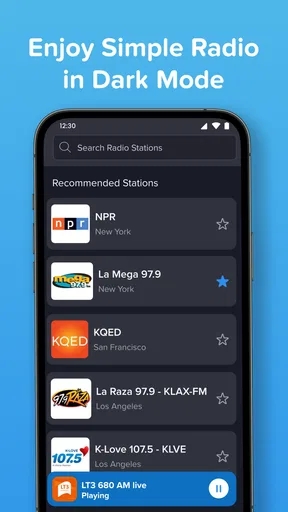
 Analysis by AppCompare
What makes a radio app useful to me is not simply the number of stations it can surface; it is how quickly I can get from “I want something to listen to” to a station that suits the moment. That is the central appeal of Simple Radio: Live AM FM Radio: it puts live station listening in reach without asking me to treat music as a playlist project. I can look for a familiar broadcaster, save it, and return later, or browse when I want a different kind of company.
A quick route to live radio
Simple Radio is a free music and audio app from Streema, Inc., built around listening to live radio rather than collecting tracks. That difference matters. A streaming-music service usually asks me to choose songs, albums, or mixes; here, I tune into a station and let its presenter, schedule, and selection shape the listening. It is a better fit when I want a continuous stream of discovery or conversation than when I need a particular song on demand.
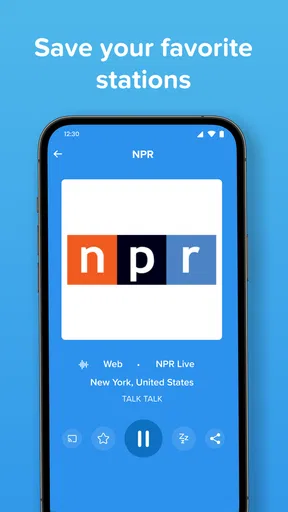
The practical benefit is the low-friction start. I can search for a station by name, genre, or location, then save the ones I expect to revisit. That creates a useful middle ground: browsing is available when I feel curious, but I do not have to repeat the same search every time I want my regular news or music station. For me, that saved-list workflow is more valuable than an oversized catalog I would never explore.
Finding a station that fits the moment
Search and browsing serve different purposes here. Searching is the sensible choice when I already know a broadcaster or have a particular style in mind. Browsing by genre is more useful when I want the app to help me break out of my usual listening habits. I would use location as a clue when looking for local voices or regional programming, then save any station that proves worth returning to. Those small choices turn a broad directory into a personal listening routine.
A realistic use is a weekday commute: I can start with a familiar local station for traffic and conversation, switch to a music station when I want a change of pace, and keep both in Favorites for the next trip. On a walk, I might browse instead, because discovering a station is less distracting when I am not trying to manage a queue. The app’s strongest role is as a simple way to keep live audio close at hand, not as a replacement for every listening service I use.
What to expect from streaming
Because this is live internet radio, the experience depends on having a usable connection. A station stream is not the same as an offline playlist: if I lose connectivity, I should not expect saved stations to keep playing without it. That is worth considering before a flight, a trip through poor coverage, or a commute with frequent dead zones. I would test the route with my usual stations before relying on the app for a long journey.
There is also a small but important difference between saving a station and controlling what it plays. Favorites make it quicker to return to a broadcaster, but the station still decides its own sequence and programming. That is part of radio’s appeal, especially for news, sports, presenters, and unexpected music; it is also why someone who wants precise control over every track may be happier with an on-demand music service. I treat the app as a companion to those services, rather than expecting it to behave like one.
Worth Reading Before You Choose

Flipboard Shows What News Apps Must Do Beyond the Feed

Switching to Android Auto Means Rethinking Your Driving Routine

Google Calendar Makes a Crowded Week Easier to Manage

Ludo King Makes the Most of the Minutes Between Plans

Baby Panda World Brings Quick Play to Modern Phones, but Its Game Library Feels Busy

ESPN’s Live Game View Makes Following Close Games Easier
Who will get the most from it
I would recommend Simple Radio to listeners who enjoy the character of live broadcasts, people who want an uncomplicated way to find stations, and anyone who likes switching between music, news, sports, and talk. It can also suit someone who has moved away from a familiar area and wants to look for radio from elsewhere. If you mainly listen to downloaded albums, want to build a specific song queue, or need audio that works without internet, this is probably not the right primary app for you.
The app is rated Teen, and its current version is 6.1.5, with support for Android 6.0 and later. It has a 4.8 average from around 837,000 ratings, and more than 50 million installs; that kind of reach suggests it has become a familiar option for people looking for radio on a phone. It is free to download, with in-app purchases ranging from $0.99 to $29.99 per item, so I would check the purchase details in the app before buying anything rather than assuming every optional item is included at no cost.
The key question is whether you want a station or a playlist. If the appeal is hearing a presenter, catching a live sports broadcast, or letting a broadcaster choose the next track, this format makes sense. If you want a guaranteed selection, repeat control, or listening that does not rely on a live connection, a conventional on-demand service is the more practical choice. I find that distinction more useful than judging the app against music players that are designed to solve a different problem.
Discovering Simple Radio
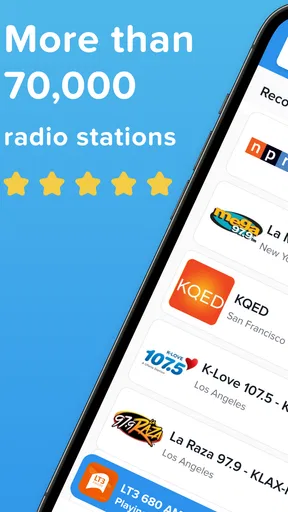
I came across Simple Radio while searching for an easy way to listen to my favorite stations without the hassle of a traditional radio. The app promises access to over 50,000 stations from around the world, right at your fingertips. Talk about being spoiled for choice!
Installation is a breeze. Just a quick download from the App Store or Google Play, and you’re ready to go. I was pleasantly surprised by the minimal setup. No need for account sign-ups or personal details. Just open the app, and you’re immediately in tune with the world of radio.
Interface and Usability
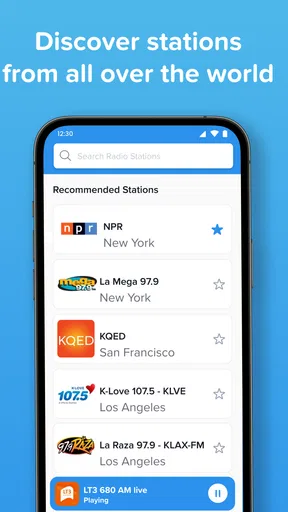
The interface is as straightforward as it gets. The main screen displays a search bar and a list of popular stations. You can search by station name, genre, or location, which makes finding your favorite station super easy. I love how the app keeps things simple—no unnecessary frills or distractions.
The app’s design is clean and uncluttered, which I really appreciate. It’s easy to navigate, even if you’re not particularly tech-savvy. The stations load quickly, and the sound quality is top-notch, even if you have a spotty internet connection. Plus, there’s a handy sleep timer feature that lets you drift off to sleep with your favorite tunes and not worry about draining your battery overnight.
Exploring the Features
One of Simple Radio’s standout features is its favorites list. You can save your preferred stations for quick access later. This is perfect for those of us who like to hop between different genres and moods. I have everything from smooth jazz to classic rock saved, and it’s all just a tap away.
The app also lets you explore stations by genre. Whether you’re into sports, news, music, or talk shows, there’s something for everyone. I found myself discovering new stations and shows that I wouldn’t have come across otherwise. It’s like having an endless supply of entertainment in your pocket.
Performance and Reliability
In terms of performance, Simple Radio doesn’t disappoint. The app is stable, and I haven’t experienced any crashes or freezes. It runs smoothly in the background, allowing you to multitask without missing a beat. The streaming is consistent, and I’ve yet to encounter any buffering issues.
Another impressive aspect is the app’s low data usage. If you’re worried about burning through your data plan, fear not. Simple Radio is efficient and won’t gobble up your data, even if you’re streaming for hours on end.
Final Thoughts
In a world where everything seems to require a subscription or account, Simple Radio: Live AM FM Radio is a refreshing change. It’s free, easy to use, and offers a world of radio at your fingertips. Whether you’re a radio enthusiast or just looking for a way to pass time on your commute, this app is worth checking out.
So, if you’re ready to elevate your listening experience and explore the vast world of radio, give Simple Radio a try. It’s a small app with a big impact, and it might just become your go-to source for entertainment on the go.
Pros
- User-friendly interface for easy navigation.
- Wide range of global radio stations available.
- Quick loading with minimal buffering.
- No account required for basic usage.
- Customizable station favorites list.
Cons
- Limited features in free version.
- Ad interruptions in the free tier.
- Occasional bugs affecting streaming.
- No recording feature for radio shows.
- Lacks advanced search options.
FAQs for Simple Radio: Live AM FM Radio
What is Simple Radio: Live AM FM Radio?
Simple Radio is a mobile application that allows users to listen to live AM and FM radio stations from around the world. It provides a user-friendly interface for discovering new music, staying updated with news, and enjoying a variety of radio shows in real-time.
Is Simple Radio free to use?
Yes, Simple Radio offers a free version that provides access to numerous radio stations. However, there is also a premium version available, which offers additional features such as an ad-free experience and higher-quality audio streaming, enhancing the overall listening experience.
Can I use Simple Radio offline?
No, Simple Radio requires an internet connection to stream live radio stations. Whether you're using Wi-Fi or mobile data, an active internet connection is necessary to access and listen to the wide range of stations available through the app.
How do I search for specific radio stations on Simple Radio?
Simple Radio features a straightforward search function where users can enter the name of a radio station, genre, or location to find specific content. Additionally, the app offers curated lists and recommendations, making it easy to discover new stations based on your preferences.
Is Simple Radio available on both Android and iOS devices?
Yes, Simple Radio is available for download on both Android and iOS platforms. Users can find the app in the Google Play Store for Android devices and the App Store for iOS devices, ensuring a seamless experience across different operating systems.


